 ENEnglish
 LTLietuviškai
 DEDeutsch
 FRFrançais
 RUРусский
 ESEspañol
 PLPolski
 ITItaliano
 UKУкраїнська
 CSČeština
 PTPortuguês
 JA日本語
 LVLatviešu valoda
 ETEesti
 HUMagyar
 IDBahasa Indonesia
 TRTürkçe
 HIहिन्दी
 ELΕλληνικά
 ARالعربية
 THไทย
 VITiếng Việt
 RORomână
 MSBahasa Melayu
 BNবাংলা
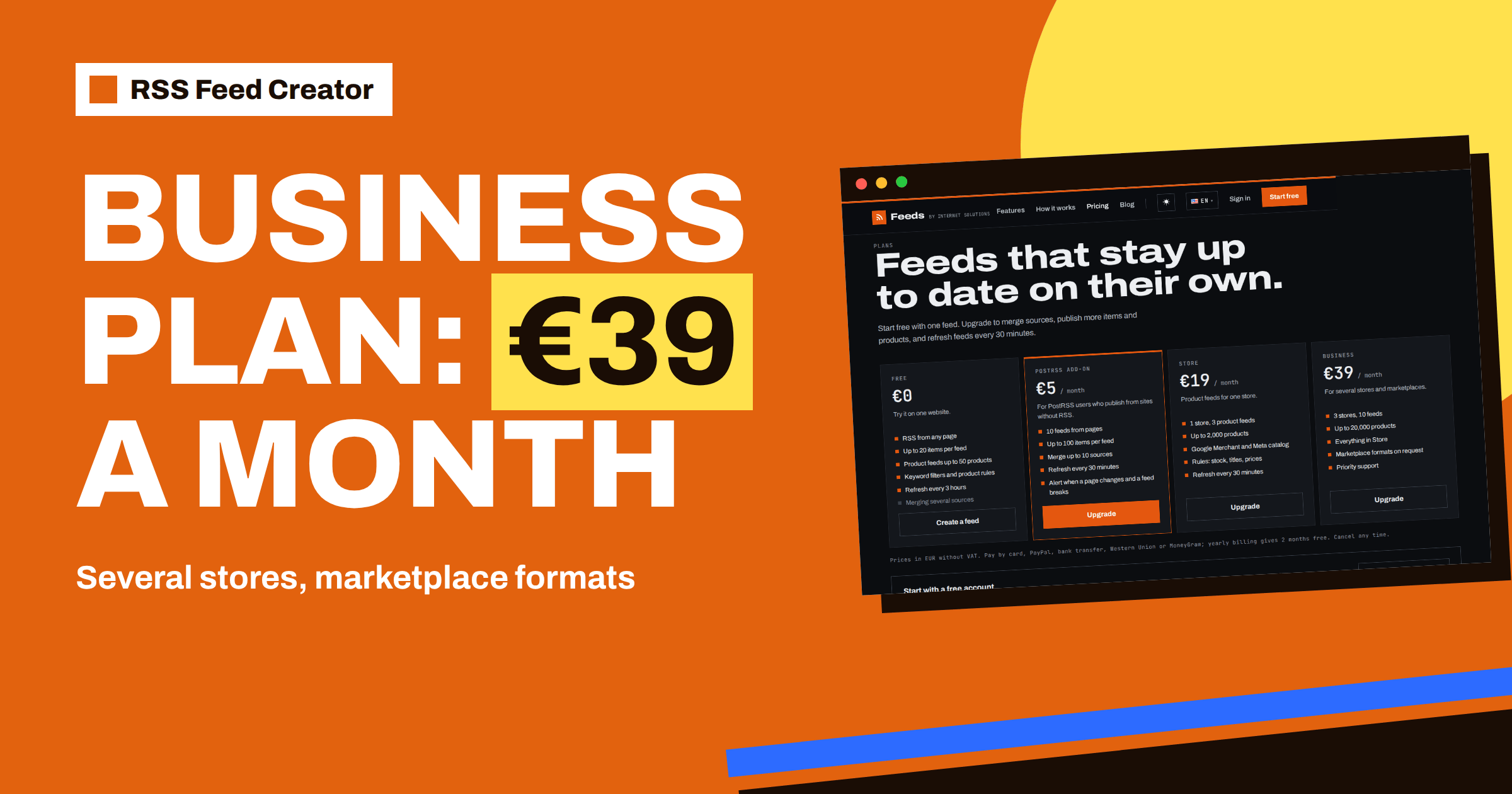
Short answer: The Business plan costs €39 per month and is for people who run more than one store or sell in more than one market. It covers 3 stores and 10 feeds, lists up to 20,000 products on the pricing page, includes everything in the Store plan, offers marketplace formats on request and comes with priority support. If you have a single shop, the Store plan at €19 is the better fit; if you manage several shops, clients or country sites from one account, Business is the plan that is built for it.
What the Business plan is for
The three plans for product feeds answer three questions. The free plan asks whether the tool works on your data. The Store plan covers one store with scale and speed. The Business plan covers the case in which “one store” is no longer true: a brand with separate storefronts per country, a retailer with a main shop and an outlet, an agency with several e-commerce clients, or a company that sells through its own site and also feeds marketplaces.
In all of these, the work is the same as for one store, only repeated. You connect each store, check its preview, set its rules and give its feed address to the channels. The account then becomes the place where all stores can be seen together, which is where the Business plan earns its keep. The routine for one store is in connect WooCommerce, Shopify or a CSV to RSS Feed Creator.
Business and Store side by side
| Store (€19) | Business (€39) | |
|---|---|---|
| Stores | 1 | 3 |
| Feeds | 3 product feeds | 10 feeds |
| Products | Up to 2,000 | Up to 20,000, as listed on the pricing page |
| Google and Meta output | Yes | ทุกอย่างในแพ็กเกจร้านค้า |
| รูปแบบมาร์เก็ตเพลส | No | On request |
| Support | Standard | Priority |
The prices are in euros without VAT, yearly billing gives 2 months free and you can cancel at any time. The numbers come from the pricing page, which is the place to check before you decide, since limits can be refined over time.
Three stores: what counts as a store
The question looks trivial, but it decides which plan you need, so it is worth a minute of thought before you pay for anything.
In practice, a store is a separate shop with its own address and its own catalogue: a WooCommerce site, a Shopify store or a CSV file that stands for one range. Two language versions of the same site on one platform are usually one store in practice, while two different domains with separate catalogues are two. If you are unsure how to count, use the number of different store addresses and CSV sources you want to feed.
Three stores can be three clients of an agency, three country shops of one brand or the shop, the outlet and a wholesale catalogue of one company. If you need more than the plan lists, the pricing page names an address to write to.
Ten feeds: patterns that work
The number of feeds is a budget, and it is worth spending it deliberately rather than creating a feed for every idea. Each feed should have a clear owner, a clear channel and a clear reason to exist.
Ten feeds across three stores leave room for a sensible structure. Some patterns:
- One main feed per store and a spare for tests, which gives six feeds for three stores.
- One feed per channel for the main store, when you want different titles for Google and Meta, plus a single feed for each of the other two stores.
- Stores plus pages. Because feeds are not limited to products, some of the ten can be page-based feeds, for example a feed of a supplier’s announcements.
Name every feed with the store first, for example “DE | Products | main” and “UK | Products | outlet”, so that the list sorts itself. The reasoning is the same as in run client feeds from one RSS Feed Creator account, and one product feed or several? when to split your catalog helps with the general question.
Setting up three stores in one afternoon
The work is easier than it sounds, because the steps repeat. Start with the store you know best. Create its feed, read the preview, set the rules and submit the address to its channels. Write down what you changed from the defaults: the title template, the stock option, any price percentage. Then do the second store with the same settings as the starting point and adjust only what differs, such as the currency fallback for a CSV.
For the third store, the process is routine. Keep a simple sheet with one row per feed: the store address, the feed name, the feed address, the channels it feeds, the date of the last check. That sheet is your control panel and your handover document. After the first week, review the diagnostics for each channel and compare the item counts with the stores. Differences should be explainable by missing prices, missing images or stock, as in missing products in your feed: why items are left out.
Finally, decide who checks what and when. A monthly review of every feed, with the update times and read counts visible on the account page, is usually enough. If one store needs more attention, such as one with daily promotions, give it a shorter cycle.
Large catalogues
Scale changes the way you work, not the way the tool works: the same preview, the same management page and the same rules apply, but you need more discipline around checking.
The pricing page lists up to 20,000 products for the Business plan, and a catalogue of that size needs more care than a small shop. Count items, with each variant on Shopify as an item, and check the item count on the management page after the first build. Review the preview first, because errors in the data affect thousands of products at once rather than dozens: a wrong currency, a missing image rule or a price percentage left in the settings.
After the first fetch, study the diagnostics in Merchant Center and Meta by group, not by product, and fix the biggest group first. Product feed health metrics: what to monitor every week offers a routine that scales.
รูปแบบมาร์เก็ตเพลสตามคำขอ
Selling on marketplaces is often the reason a company outgrows a single-store setup, because each marketplace brings its own rules and review process.
Google and Meta read the Google product XML format, which is what RSS Feed Creator writes by default. Marketplaces often want something different: other field names, other category rules or a different file format. The Business plan includes marketplace formats on request, which means you ask for the format you need rather than choosing it from a list.
To get a useful answer, send the marketplace’s name, a link to its feed specification, a sample file if you have one and the store the feed should come from. Treat the arrival of a new format as something to be agreed with support, not as something that is available instantly. The differences are explained in marketplace product feeds: what changes from Google format.
ซัพพอร์ตแบบเร่งด่วน
Support is also the place to ask about situations that the plan description does not spell out, such as an unusual store platform or a catalogue that sits at the edge of a limit.
Priority support is worth planning for. When a feed in front of thousands of products misbehaves, speed matters. A good support message contains the address of the feed, the address of the store, what you expected, what you saw and the time of the last update shown on the management page. With that in hand, the question can be answered without a long exchange. The contact address is shown on the pricing page.
Billing and cancelling
Business is a monthly decision. If your stores are seasonal, you can choose yearly billing and keep the plan through the quiet months, or you can pay monthly and cancel when a season ends, knowing that your feeds will keep working within the free plan limits.
You pay by card, PayPal, bank transfer, Western Union or MoneyGram, monthly or yearly. Card and PayPal activate the plan at once, and a bank transfer activates it when the payment arrives. If you cancel, your feeds keep working within the free plan limits, which means nothing disappears, but features and larger limits of the Business plan no longer apply. Keep this in mind for feeds that channels fetch: if a limit drops, the feed can hold fewer products at the next refresh.
Related reading
- Product Feed Management for Agencies: Many Clients, One Process
- Multi-Country Product Feeds: Currency, Language and Prices
- Product Feed Checklist: 25 Checks Before You Submit
The bottom line
Choose Business when one store is not the whole picture: 3 stores, 10 feeds, large catalogues, marketplace formats on request and priority support. Count stores and items honestly, name feeds consistently and make the first build a careful review, since mistakes at this scale are multiplied.
FAQ
How many stores does the Business plan cover?
Three stores and 10 feeds.
What are marketplace formats on request?
Formats other than the Google and Meta product XML, which you can ask for. Send the marketplace name and its specification.
How many products can I include?
The pricing page lists up to 20,000 products for the Business plan.
Is support different on this plan?
Yes. The Business plan includes priority support.
What happens if I cancel the plan?
Your feeds keep working within the free plan limits.


